How to Activate Airalo eSIM on iPhone & Android (Complete Walkthrough)
Learn how to activate an Airalo eSIM on iPhone & Android with this easy step-by-step guide. Avoid common setup mistakes and get connected in under 5 minutes!
ACCESSORIES
Dinalex Travel Tours
5/22/20268 min read


Introduction to Airalo eSIM Activation
The Airalo eSIM represents a significant advancement in mobile connectivity for travelers, offering a modern solution to a common issue: high roaming fees. In a world where global travel has become increasingly accessible, the challenge of maintaining reliable mobile service can often lead to unexpected expenses. By utilizing Airalo's eSIM technology, travelers can enjoy local data plans without the burden of exorbitant charges.
Imagine landing in a new country, eagerly anticipating your adventure. However, the thought of paying hefty international roaming fees for data access can dampen that excitement. With Airalo, this concern is mitigated, as users can seamlessly access affordable data plans tailored to their specific destination. Whether you are exploring the bustling streets of Tokyo or lounging on the beaches of Bali, having a reliable data connection is crucial for navigating unfamiliar places, staying connected with loved ones, and sharing experiences in real-time.
Furthermore, the practicality of Airalo's service cannot be overstated. Travelers no longer need to seek out local SIM cards or rely on Wi-Fi hotspots, which can often be unreliable or insecure. Instead, with a quick and straightforward activation process, users can have local data benefits instantly, enhancing their travel experience. This innovative service is designed with the modern traveler in mind, ensuring hassle-free connectivity that empowers users to focus on making memories rather than worrying about their phone service.
As the travel landscape evolves, Airalo stands out as a solution that not only prioritizes function but also enriches the overall journey. In the next sections, we will delve deeper into the activation process of Airalo eSIM, helping you leverage this technology for your travels.
Understanding Airalo eSIM: Key Features and Benefits
Airalo eSIM technology presents a transformative approach to mobile connectivity, particularly for travelers seeking reliable data access without the inconveniences associated with traditional SIM cards. One of the standout features of Airalo eSIM is its compatibility with a wide range of devices. Most modern smartphones, tablets, and wearables support eSIM functionality, making it easier than ever for users to integrate this technology into their daily lives. As long as your device is eSIM-enabled, activating an Airalo eSIM can be done swiftly and efficiently.
The installation process is straightforward, requiring minimal technical expertise. Users can download the Airalo app on their devices, select a suitable data plan based on their travel needs, and activate the eSIM with just a few taps. This ease of installation eliminates the hassle of physically swapping SIM cards, enabling seamless transitions between different networks, particularly in international settings.
Airalo's diverse selection of data plans caters to various user requirements, ranging from short-term usage for weekend getaways to more extensive plans for longer trips. Each package allows travelers to choose data allowances according to their specific needs, ensuring they stay connected without overspending. Moreover, the instant activation feature means users can acquire and activate their chosen plan even before reaching their destination, providing peace of mind and uninterrupted access to mobile services.
By enabling users to switch carriers without the need for a new physical SIM card, Airalo eSIM not only significantly reduces costs associated with international roaming but also promotes flexibility and convenience in managing mobile data. This innovative solution reshapes how we connect while traveling, ultimately fostering a more enjoyable and connected travel experience.
How to Install Airalo eSIM: A Step-by-Step Guide
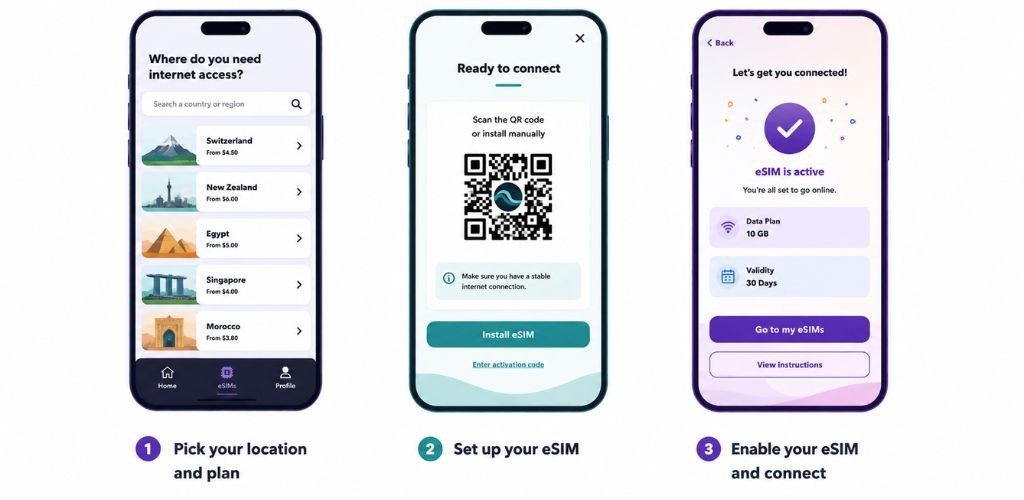
Installing the Airalo eSIM on your device is a straightforward process that can be completed in just a few steps. Below is a comprehensive guide for both iPhone and Android users to help facilitate a seamless installation experience.
For iPhone Users:
Download the Airalo App: Start by visiting the App Store and searching for the Airalo application. Download and install it on your device.
Create an Account: Launch the app and create an account if you haven’t already. Ensure that you have a stable internet connection.
Select a Plan: Browse through the listed eSIM plans and select one that meets your data needs. Proceed to purchase the plan, and you will receive a QR code.
Open Settings: Go to your device's Settings, tap on "Cellular," and then select "Add Cellular Plan."">
Scan the QR Code: Use your device’s camera to scan the QR code you received. Follow the prompts to complete the installation.
Label Your Plan: After installation, you have the option to label your plan for easy identification. This is especially useful if you have multiple plans.
Enable Your eSIM: Once the plan is installed, enable your eSIM in the cellular settings to start using it immediately.
For Android Users:
Download the Airalo App: As with iPhone, begin by downloading the Airalo app from the Google Play Store.
Create an Account: Open the app and create your account.
Select and Purchase Your Plan: Browse through available eSIM options and purchase one that fits your requirements.
Settings Menu: Navigate to Settings and tap on "Network & internet," then select "Mobile Network."">
Add a Carrier: Choose "Add carrier" and then tap on "Scan QR code" to scan the QR code from your purchased plan.
Complete the Installation: Follow the on-screen instructions until the eSIM installation is completed.
During installation, some common issues may arise, such as difficulties in scanning the QR code or network connectivity problems. Ensure your device is connected to Wi-Fi and that you are using the correct QR code for installation. If issues persist, consulting the Airalo support team can provide further assistance.
Activating Airalo eSIM: The Process Unveiled
Activating your Airalo eSIM involves a straightforward process, which can vary slightly depending on whether you choose manual or automatic activation. For most users, automatic activation is the preferred method. This process generally involves scanning a QR code provided by Airalo, which will prompt your device to automatically set up the eSIM without much user intervention.
To begin with automatic activation, ensure that your device is eSIM-compatible and has Wi-Fi access. After purchasing your eSIM plan, you will receive a QR code via email or your Airalo account. Open the settings of your device, tap on "Cellular" or "Mobile Data," and select "Add Cellular Plan." From here, scan the QR code. Follow the prompts to complete the activation. It typically takes only a few minutes for the eSIM to become functional.
In cases where the automatic method does not succeed, you can opt for manual activation. In this scenario, you will need to enter details such as the SM-DP+, activation code, and other required settings manually into your device’s network settings. While this method is more tedious, it is beneficial for those who encounter issues with automatic activation.
Common problems associated with eSIM activation include errors indicating that the "Airalo eSIM is not activating." If you encounter such issues, ensure that your device is updated to the latest version and that you have an active internet connection during the setup. Additionally, check if mobile data and data roaming have been enabled. If these do not resolve the issue, resetting your network settings may be necessary.
To enable data roaming and set the Airalo Access Point Name (APN), navigate to your device's cellular settings. Activate data roaming to ensure you can use mobile data abroad. For APN settings, manually enter the details provided by Airalo. This configuration is often crucial for achieving seamless connectivity, allowing your device to use the local network optimally.
Using Airalo eSIM: Connecting to Networks and Managing Data
After successfully activating your Airalo eSIM, the next essential step is connecting to local networks and efficiently managing your data usage. The process begins with ensuring that your device is set up correctly to recognize the eSIM profile you just installed. Navigate to your device's settings, locate the cellular or mobile data options, and select the Airalo eSIM plan to enable it.
Once activated, your device will begin searching for local carriers. This typically occurs automatically; however, you may want to manually select a network if you encounter issues. Briefly, accessing the network list will allow you to connect to the optimal service provider available in your location. Keep in mind that the availability of certain networks may vary, particularly when traveling across different regions.
Managing data usage is critical, especially for travelers on the go. Airalo provides a framework within its app to monitor your data consumption, which can be helpful in preventing unexpected overages. Make sure to regularly check the app for updates on your remaining data. You can adjust your data settings to optimize performance; for instance, limiting background data usage for apps that do not require constant connectivity helps conserve your data allowance.
Switching between various Airalo plans is straightforward. If you find that your current plan does not suit your needs (perhaps due to higher data demands or extended travel), navigate through the app to explore other available plans. Consider activating multiple eSIMs when traveling to multiple countries to ensure seamless connectivity. Being mindful of these strategies will ensure you can navigate your digital life smoothly, staying connected without interruption regardless of your destination.
Frequently Asked Questions About Airalo eSIM Activation
The introduction of Airalo eSIM technology has raised several queries among potential users. Below, we address some of the most common questions regarding Airalo eSIM activation, compatibility, pricing, and troubleshooting.<\/p>
1. Is my device compatible with Airalo eSIM?
Compatibility is a key concern. Airalo eSIMs work with devices that support eSIM technology, including most recent smartphones and tablets from brands like Apple, Samsung, and Google. You can check your device's compatibility by visiting the Airalo website or consulting your device's manual. Ensure that you have the latest software updates installed for optimal performance.<\/p>
2. How much does an Airalo eSIM cost?
Pricing for Airalo eSIMs varies based on the chosen plan and destination. Airalo offers a range of data packages tailored for short trips or extended stays, ensuring you have the right plan for your needs. Users can review the pricing options on the Airalo application or website. Transparency in pricing contributes to an informed decision-making process for prospective customers.<\/p>
3. What should I do if I encounter connectivity issues?
If you experience trouble connecting after activating your Airalo eSIM, there are several troubleshooting steps you can follow. First, ensure your device is connected to the internet. If issues persist, check the APN settings: these may need to be configured based on the carrier's requirements. Restarting your device or toggling airplane mode can also help restore a connection. For persistent problems, reaching out to Airalo's customer support can provide further assistance.<\/p>
4. How do I manage my data usage while using Airalo eSIM?
Monitoring data usage is crucial when utilizing eSIM services. Airalo provides a straightforward interface where you can track how much data you have consumed. Setting alerts or limiting background data for applications can also help manage your data usage effectively. Staying informed allows users to maintain control over their connectivity expenditure while traveling.<\/p>
By addressing these common inquiries, future users can confidently navigate the world of Airalo eSIM activation and usage. Understanding the technology and available support can enhance the travel experience significantly.
Conclusion and
In today's digital age, staying connected while traveling is more important than ever. Utilizing an Airalo eSIM offers a convenient and efficient solution for travelers looking to maintain seamless connectivity across different regions without the hassle of traditional SIM cards. With Airalo’s extensive range of plans, users can enjoy affordable data packages that cater to their specific needs without incurring excessive roaming charges.
The ability to easily switch between different data plans and countries through an eSIM eliminates the stress associated with finding local SIM cards, ensuring that travelers can focus on their experiences rather than connectivity issues. Whether you are on a short getaway or an extended trip, the Airalo eSIM provides a reliable and flexible option that enhances your travel experience.
As you plan your next adventure, we encourage you to consider the benefits that come with the Airalo eSIM. Don’t wait until you are in a location that lacks decent connectivity options or face exorbitant roaming fees. Take action now by exploring the various plans available on the Airalo website. By opting for an Airalo eSIM, you are not only ensuring that you remain connected during your travels but also making a smart choice for your budget.
Visit the Airalo website today to learn more about their offerings and find the plan that best suits your travel needs. Join the growing community of travelers who have embraced the flexibility and convenience of Airalo eSIMs, and enhance your journeys with uninterrupted connectivity.
🌏 Stop Paying for Expensive Data Roaming!
Travel the world with fast, affordable, and seamless internet right on your phone.
✨ Budget-friendly plans
✨ Seamless global switching
✨ Keep your original number
👉 Don't get stranded without data
Enter your travel destination below to see available eSIM plans! ✈️📱